


Your business card is tiny. But it can do big work. It can start a chat, spark trust, and help someone remember you later. A great card says, “I am serious, but also easy to work with.”
TLDR: A strong business card is clear, simple, and easy to read. The best design platforms help you make one fast, even if you are not a designer. Try tools like Canva, Adobe Express, Vistaprint, Moo, and Zazzle for clean templates and print options. Pick a style that matches your brand, then keep the details sharp.
Why business cards still matter
Yes, we live in a digital world. We send emails. We scan QR codes. We follow each other online. But business cards are still useful.
They feel personal. They are easy to share. They do not need Wi Fi. They also give people a small reminder of you after a meeting, event, or quick coffee chat.
A good card can say a lot in a few seconds. It can show your style. It can show your role. It can show that you care about details.
That is why your card should not look like a boring rectangle from 1998. It should feel fresh, clear, and very you.
What makes a strong business card?
A strong business card is not packed with everything you have ever done. It is not a tiny resume. Please do not make people squint.
Instead, keep it simple. Include only what matters most.
- Your name
- Your job title or business name
- Your phone number or email
- Your website or portfolio
- Your logo, if you have one
- A QR code, if it helps
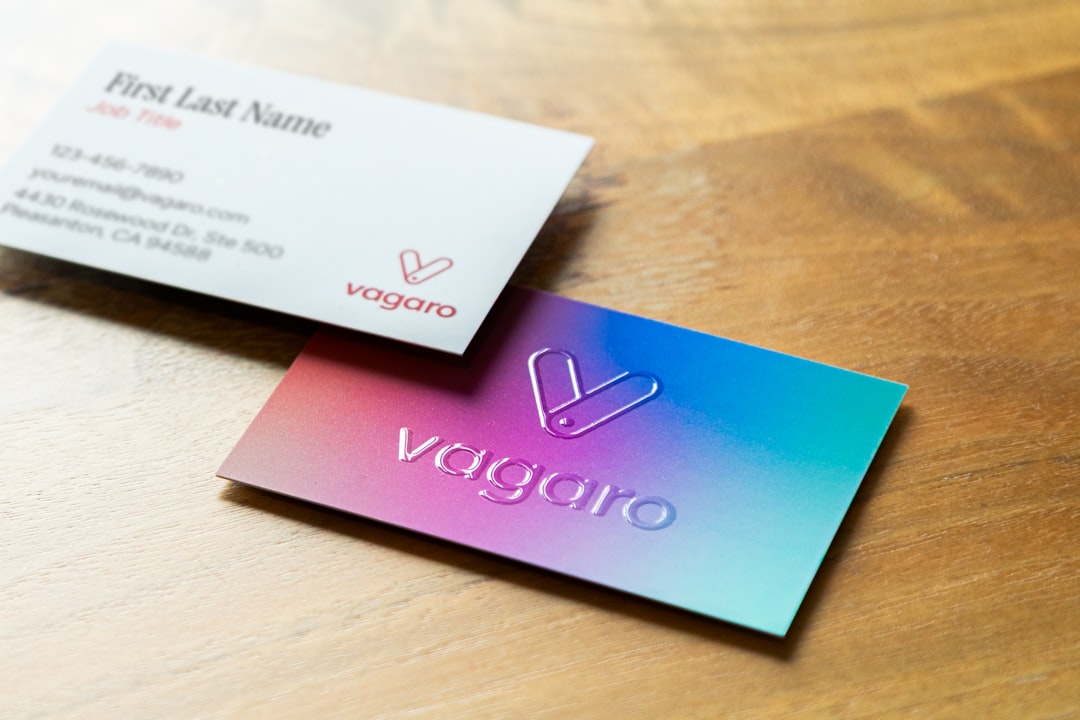
Use fonts that are easy to read. Choose colors that fit your brand. Leave some empty space. Empty space is not wasted space. It helps your card breathe.
Now let’s look at some fun and simple platforms that can help you design one.
1. Canva
Canva is one of the easiest places to make a business card. It is friendly. It is colorful. It is also great for beginners.
You can pick a template, change the text, swap colors, and add your logo. The drag and drop editor is simple. You do not need design skills. You just need a little patience and maybe a snack.
Canva has many styles. You can find cards that look modern, bold, soft, playful, elegant, or minimal. It also offers printing in some regions, so you can design and order in one place.
Best for: small business owners, freelancers, coaches, creators, and anyone who wants a fast design.
Quick tip: Do not use too many fonts. Pick one or two. Your card will look cleaner.
2. Adobe Express
Adobe Express is another simple tool with a polished feel. It is made by Adobe, but it is much easier than pro design software. You can use templates, icons, fonts, and brand assets.
This platform is a nice choice if you want something that looks clean and professional. It is also useful if you already use Adobe tools.
You can start with a template and adjust the layout. You can add your logo, change colors, and create a card that fits your brand. It is not scary. It is more like design with training wheels.
Best for: professionals, consultants, designers, agencies, and teams that want a polished look.
Quick tip: Use your brand colors. This makes your card match your website, emails, and social pages.
3. Vistaprint
Vistaprint is famous for printing business cards. But it also has design tools and templates. That makes it a good all in one choice.
You can choose a layout, add your details, and then select paper type, finish, and quantity. Want glossy cards? They have that. Want matte cards? Also yes. Want something thicker? You can do that too.
Vistaprint is very practical. It is great when you need cards without making the process complicated.
Best for: local businesses, event vendors, real estate agents, service providers, and people who want design plus printing.
Quick tip: Order a small batch first if you are testing a new design. You can improve it later.

4. Moo
Moo is known for premium business cards. If you want your card to feel special, Moo is worth a look.
The design process is simple, but the real fun is in the print options. Moo offers thick paper, smooth finishes, rounded corners, and bold styles. Their cards often feel high quality in the hand.
This matters more than you might think. When someone touches a strong, smooth card, they notice. It can make your brand feel more valuable.
Moo also lets you print different designs in one pack on some products. That is great for photographers, artists, and creative people who want to show variety.
Best for: creatives, premium brands, photographers, artists, founders, and people who want a “wow” moment.
Quick tip: If your design is simple, better paper can make it feel much more impressive.
5. Zazzle
Zazzle is a fun platform with many design options. It has loads of business card templates in many styles. Some are classic. Some are cute. Some are bold. Some are very niche.
This makes Zazzle great if your business has personality. Maybe you run a pet grooming shop. Maybe you sell handmade candles. Maybe you are a yoga teacher. You can find designs that feel warm and personal.
You can customize templates with your name, logo, contact details, and colors. Then you can order printed cards directly.
Best for: small shops, hobby businesses, makers, personal brands, and fun service businesses.
Quick tip: Choose a template that supports your message. A serious lawyer and a birthday party planner should not use the same style.
6. VistaCreate
VistaCreate is a simple design platform with many ready made templates. It feels a bit like Canva, with an easy editor and lots of visual assets.
You can make a clean business card quickly. You can also create matching social posts, flyers, and banners. This helps if you want your whole brand to look connected.
The templates are useful for people who do not want to start from a blank screen. Blank screens can be rude. Templates are nicer.
Best for: social media heavy brands, new businesses, and people who want matching marketing designs.
Quick tip: Save your colors and fonts. Use them again on other materials.
How to choose the right platform
You do not need to try every tool on the internet. That way lies madness. Start with your main need.
- If you want easy editing, try Canva or VistaCreate.
- If you want a polished professional feel, try Adobe Express.
- If you want simple printing, try Vistaprint.
- If you want premium cards, try Moo.
- If you want fun templates, try Zazzle.
Also think about budget. Some platforms are free to design with, but printing costs money. Paper type, finish, and shipping can change the final price.
Always check the preview before ordering. Look for typos. Check your phone number. Check your email. Then check again. A beautiful card with the wrong email is just a tiny tragedy.

Simple design rules to follow
Here are a few easy rules that can save your card from chaos.
- Keep it readable. Tiny text is not your friend.
- Use contrast. Dark text on a light background works well.
- Limit colors. Two or three main colors are enough.
- Add space. Do not crowd the edges.
- Use both sides. Put your logo on one side and details on the other.
- Think about texture. Paper can make a simple card feel fancy.
If you add a QR code, test it first. Make sure it goes to the right page. A QR code should lead to your website, booking page, portfolio, menu, or contact form.
Final thoughts
A business card is small, but it can create a strong first impression. It is a pocket sized handshake. It is a tiny billboard. It is your brand in someone’s hand.
The good news is that you do not need to be a design wizard. Platforms like Canva, Adobe Express, Vistaprint, Moo, Zazzle, and VistaCreate make the process simple.
Pick a platform that fits your style. Choose a clear layout. Use good fonts. Check every detail. Then print a card you are proud to share.
Because when someone says, “Do you have a card?” you want to smile and say, “Yes. And it looks great.”